Ubuntu's Fastest Growing Platform Isn't Linux. It's Windows.
Ubuntu adoption through Windows Subsystem for Linux (WSL) is growing faster than native Ubuntu desktop usage. Here's why developers are increasingly choosing Windows and Linux together instead of picking one over the other.

- Louis
- 4 min read
- Affiliate Disclosure
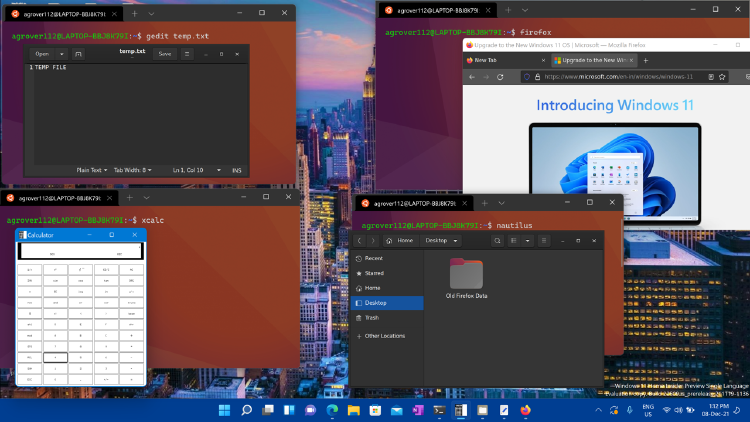
If someone told you that Ubuntu’s fastest-growing platform wasn’t Linux, but Windows, you’d probably think they got the numbers backwards.
Yet that’s exactly what Canonical is seeing.
Jon Seager, Canonical’s VP of Engineering, recently revealed that Ubuntu usage inside Windows Subsystem for Linux (WSL) is growing significantly faster than native Ubuntu desktop usage. He even suggested that Ubuntu users running through WSL could outnumber traditional Ubuntu desktop users in the near future.
At first glance, that sounds counterintuitive. After all, WSL is a Windows feature, while Ubuntu is one of the world’s most popular Linux distributions.
But when you look at how software development has evolved over the past decade, the trend starts to make perfect sense.
What we’re seeing isn’t Windows replacing Linux or Linux replacing Windows. Instead, developers are increasingly combining the strengths of both.
Why This Matters
For years, conversations about operating systems were framed as a choice.
You were either a Windows user or a Linux user.
If you needed Linux tools, the assumption was that you’d install Linux natively, dual-boot your machine, or run a virtual machine.
That assumption no longer reflects reality.
Today, many developers spend their day in Linux terminals while simultaneously relying on Windows for productivity applications, enterprise management, collaboration tools, and corporate security requirements.
The growing popularity of WSL suggests that developers are no longer interested in choosing sides. They simply want the most practical environment for getting work done.
What Exactly Is WSL?
WSL, short for Windows Subsystem for Linux, allows Linux distributions such as Ubuntu, Debian, and Arch Linux to run directly within Windows.
Developers can access Bash, SSH, package managers, programming languages, container tools, and countless Linux utilities without installing a separate operating system.
The introduction of WSL 2 was a major turning point. By leveraging a real Linux kernel, Microsoft dramatically improved compatibility, performance, and support for modern developer tooling.
For many users, the experience feels remarkably close to using a native Linux machine.
Why Are Developers Choosing WSL Instead of Installing Linux?
Most Developers Don’t Choose Their Work Computer
According to Jon Seager, Canonical frequently hears from developers who are issued Windows machines by their employers but need Linux environments for AI, machine learning, and development work. WSL allows them to run Ubuntu without fighting company hardware or operating system policies.
Linux Remains the Center of Modern Development
Whether you’re building containers, deploying cloud applications, training machine learning models, or managing infrastructure, Linux continues to be the platform around which much of the industry revolves.
What has changed is how developers access Linux.
Instead of replacing Windows entirely, many now access Linux through WSL and enjoy the benefits of both environments simultaneously.
WSL Eliminates an Unnecessary Trade-Off
Windows handles email, meetings, productivity tools, and device management.
Linux handles development, containers, scripting, and infrastructure work.
Rather than forcing developers into a single ecosystem, WSL allows both to coexist on the same machine.
AI Could Push WSL Even Further
The modern AI ecosystem remains heavily Linux-oriented.
Seager specifically pointed to AI and machine learning workloads as a major factor driving Ubuntu adoption through WSL. Developers who receive Windows laptops from employers still need Linux environments for AI-related work, making WSL an increasingly attractive option.
As local AI development becomes more common, the ability to run Linux workloads while staying inside the Windows ecosystem could become even more valuable.
From Competing With Linux to Embracing Linux
WSL has become a symbol of a larger industry shift.
Its biggest achievement isn’t that Windows can run Linux.
Its biggest achievement is that developers increasingly don’t care which platform wins.
They want the best tools available.
Windows for productivity.
Linux for development.
Containers for deployment.
Cloud platforms for production.
Instead of forcing developers to choose one ecosystem, WSL enables them to use all of them together.
And judging by Ubuntu’s growth inside WSL, that’s exactly the direction modern software development is heading.
