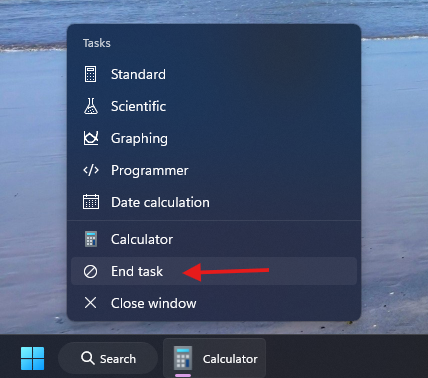
Windows 11 has a hidden feature that you may not know about - end task in taskbar by right click. It’s so useful that I don’t understand why it’s not enabled by default.
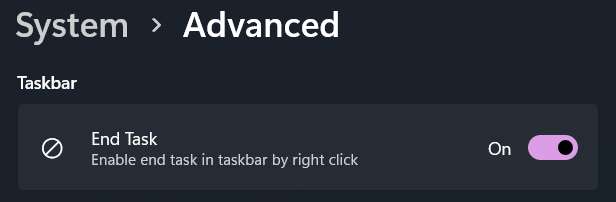
To enable it, you need to go to Settings > System > Advanced, and then toggle End Task option under Taskbar section.
What’s the difference between End Task and Close Window?
The difference is that End Task will kill the process, while Close Window will only close the window.
If you are running a program that only has a process, the front window, then the two options will do the same thing. Otherwise, End Task will kill the whole process, terminate the program completely, while Close Window will only close the window, leaving the process running in the background.
What’s the benefits of enabling this feature?
The first benefit is that you can end a unresponding process without having to open Task Manager, especially when the system loads are high, and it’s hard to open Task Manager.
Even if you can open Task Manager, there are countless processes inside, and their locations keep changing as resource usage fluctuates in real time, making it difficult to locate and terminate the target program.
The second benefit is that you can directly end a program which has background processes, without having to find its icon in the system tray area, and right click on it to select the Exit option. This does save a lot of time.
