How to buy Microsoft 365 cheap in 2026?
Microsoft 365 Personal is $99.99/year and Family is $129.99/year for up to six people. Here is how the math works, where to buy, and how to split it safely.

- Louis
- 5 min read
- Affiliate Disclosure
Microsoft 365 is a subscription service that includes a variety of apps and cloud services. Apart from Word, Excel and PowerPoint, Outlook and the OneDrive storage bundled with each plan are my favorite features of Microsoft 365.
Many people love Microsoft 365 but pay the full price every year. This post goes through what each plan actually costs and how to pay a fraction of it without handing your account to a stranger. If you want to understand how the sharing mechanism works, see our Microsoft 365 account sharing guide. Already subscribed? Quickly check your subscription status to make sure it is active. And if you are still on Office 2016/2019, it is time to switch to Microsoft 365 — those versions reach end of support on October 14, 2025. For a look at how WPS Office is emerging as an alternative in China, and what it means for the Microsoft ecosystem, see MOFCOM’s shift to WPS format on cnelecar.
Types and Full Prices
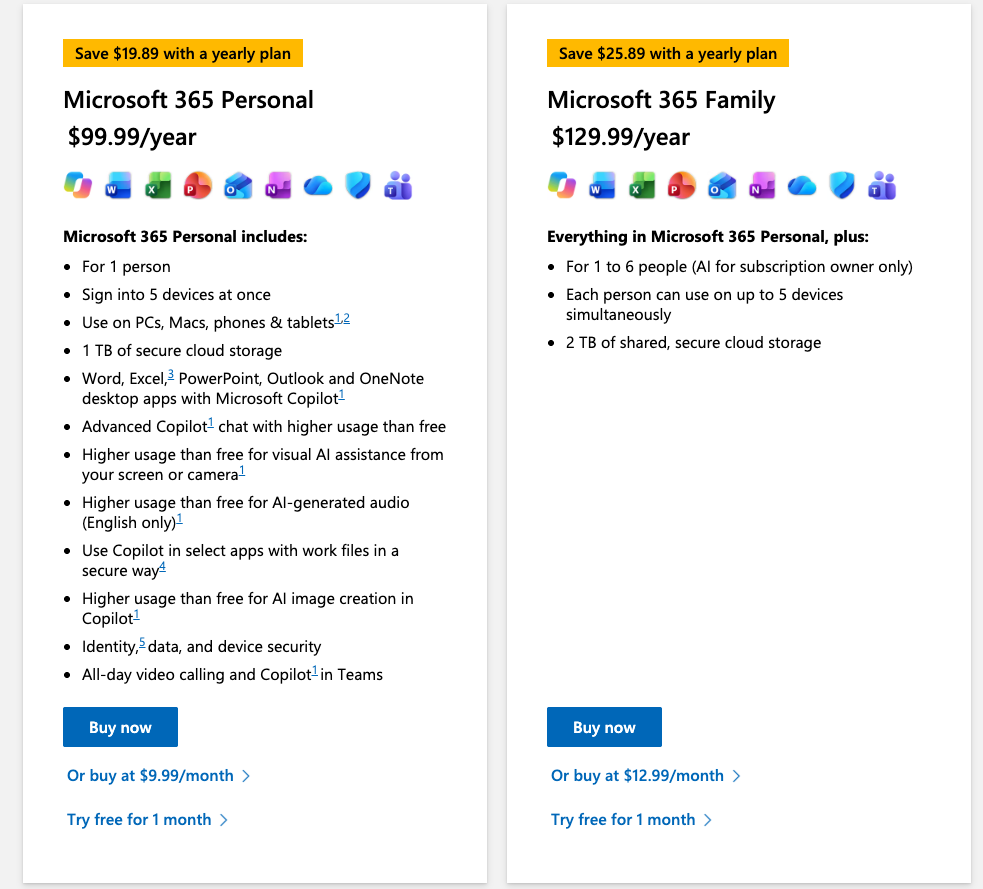
There are 2 types of Microsoft 365 subscription: Microsoft 365 Personal and Microsoft 365 Family. They include the same apps. What separates them is the number of users and the way the OneDrive storage works.
Microsoft 365 Personal is built for one user, with 1 TB of OneDrive and 5 devices signed in at the same time. Microsoft 365 Family covers up to six users, each of them with an independent Microsoft account and the same 5-device allowance of their own.
Storage changed in October 2026. Family used to give 1 TB per person, up to 6 TB across the group. It is now a single 2 TB pool shared by all six members, so one person can go past 1 TB as long as the others leave room. Personal is unchanged at 1 TB. Our news post on the storage change has the transition dates and what happens to existing subscriptions. Here are both products on Amazon at list prices (Microsoft, October 2026):
- Microsoft 365 Personal - $99.99/year
- Microsoft 365 Family - $129.99/year
The above two Microsoft 365 subscriptions are sold directly by Microsoft. They are absolutely genuine and safe.
If you click through to the product pages, you will find that Microsoft 365 Personal has more than 10,000 ratings, which shows how high the sales volume is. But if I were them, I would not buy it like this, because it works out to be the more expensive of the two. I’ll show you why.
The Math Most People Never Run
Personal at $99.99/year is the price most people pay, and it is the worst deal on the page.
$129.99 divided by 6 is $21.67 per person for a whole year. Even if you split Family with only one other person, that is $65 each, still $35 under Personal. Fill all six seats and every member pays roughly a fifth of the Personal price for the same desktop apps, the same installation rights and a private account of their own.
The six people do not have to be a household. Friends, colleagues, parents living in another city, all fine, because each member signs in with their own Microsoft account and cannot see anyone else’s files unless a file is shared on purpose.
One thing has to be accepted first: whoever redeems the code is the owner, and the owner can remove members at any time. So the five seats around you should belong to people you actually know.
Where to Buy
Amazon is where I buy mine. Microsoft 365 Family and Microsoft 365 Personal are sold there as 12-month activation codes, and the Family price moves with promotions. The yearly sales, Prime Day and Black Friday, are where the real discount usually sits.
Two details are worth checking before you pay:
- The seller should be Amazon.com itself, not a marketplace seller. The listing shows the seller directly under the price.
- The title should say Family and 12 months. One-month and one-user variants sit on the same page and cost less for a reason.
Redeem the code at microsoft365.com/setup while signed in with the account that should own the subscription. Get this step right, because the subscription stays with that account, and a temporary email address is a bad choice here.
What About the Cheap “Shared Edition” Services?
If you shop around Chinese software stores, you have seen this offer: a “Microsoft 365 Shared Edition” for a few dollars a year, sometimes sold as a 5-year plan. The seller buys a Family subscription, fills the remaining seats with paying customers, and manages the group whenever someone leaves.
The mechanism is not a scam. The seats are real, and the group manager does keep them filled. What I no longer recommend is buying into one, because a seat is not a subscription. The store is the owner. If it closes the service, sells the business or simply stops paying, your access ends with it and there is nothing you can do about it. That has already happened to the store this blog used to recommend: APSGO removed its Microsoft 365 sharing service from the platform.
Buying the Family code yourself keeps the same price advantage and puts the ownership on your side of the table.
Buying More Than One Year at a Time
Microsoft does not sell a 5-year subscription, but you can stack prepaid codes. Redeem a second 12-month code while your subscription is still active and Microsoft adds the 12 months to the end of it. The maximum is five years.
That is worth knowing when a sale shows up. Codes are not tied to a redemption date, so buying two or three years at a promotional price and redeeming them later works fine. Stacking adds time only. It does not add installations or storage.
The Bottom Line
- Buy Family rather than Personal unless you are certain you will never share it. Six ways it comes to about $21.67 each.
- Buy on Amazon, and check that the seller is Amazon.com and the code is Family/12-month.
- Be the owner yourself, then share the seats with people you trust.
- If a sale is running, stack two or three years. Five is the ceiling.
Read next: how Microsoft 365 account sharing works and how to check whether your subscription is active.
