
Sharing a Microsoft 365 subscription is by far the most cost-effective way to enjoy the service. For a full breakdown of pricing and discount options, see our guide on how to buy Microsoft 365 cheap.
Many people have heard of Microsoft 365 “carpooling” (account sharing), but don’t really know how it works. In this article, I’ll break down the logic behind it. At the same time, since many private sharing groups carry risks of being scammed, I’ll also recommend safe and reliable channels so you can enjoy Microsoft 365 worry-free.
How Microsoft 365 Sharing Works
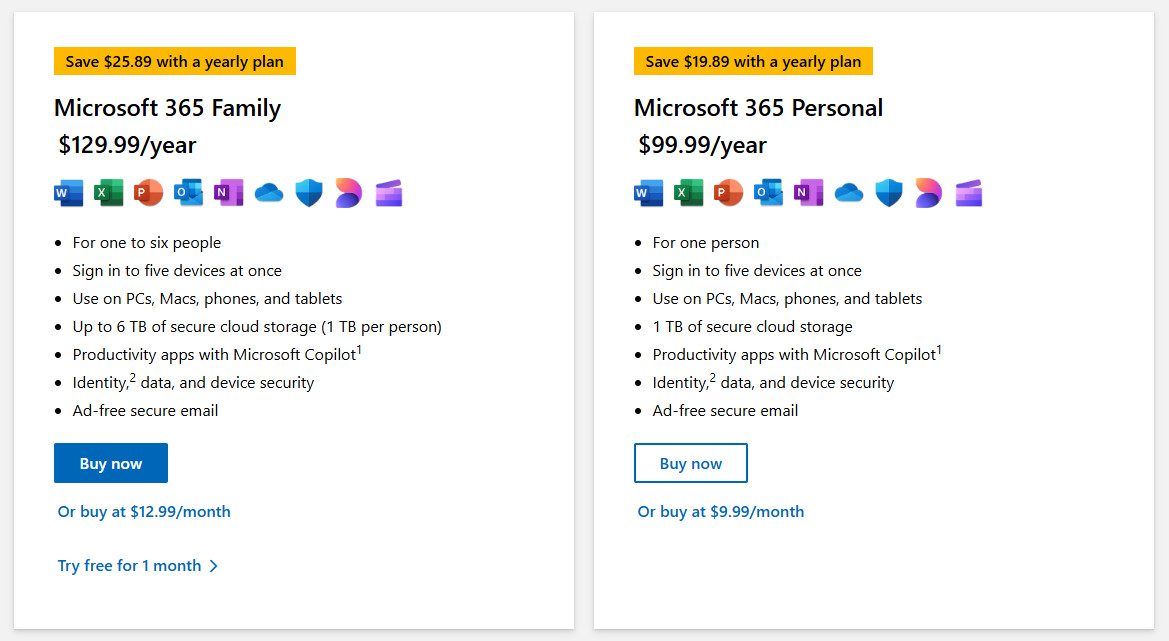
Microsoft 365 offers two subscription types: Personal and Family.
- The Personal plan is tied to a single Microsoft account.
- The Family plan can be shared with up to 6 accounts in total.
This Family plan is what makes sharing possible:
- One user (the “host”) purchases a Microsoft 365 Family subscription and binds it to his/her Microsoft account.
- The host then sends invitation links to up to 5 other people (the “guests”), each of whom binds the subscription to their own Microsoft account.
- All 6 users now enjoy the full benefits of Microsoft 365 Personal—access to all Office apps plus 1 TB of OneDrive storage each. Accounts are completely separate and private, so there’s no risk of data overlap or leakage.
On Microsoft’s official site, the Personal plan costs $99.99/year, while the Family plan is just $30 more. Split among 6 people, the Family plan is by far the better deal.
What’s the risk of joining random online sharing groups?
In theory, the best case is finding 5 others to split the Family plan with. But in practice, this is hard to coordinate, so people often post online looking for strangers to share with. This comes with a huge risk:
The host has full control of the Family subscription. That means they can simply remove guests at will. This has led to many cases where people pay their share but are either never invited or get kicked out shortly after.
That’s why it’s important to use trusted platforms.
Safe and Affordable Microsoft 365 Sharing Options
Unlike risky private groups, large software resellers offer secure sharing services. We recommend DIGITALYCHEE — a well-known online stores for genuine software, and you can buy from them with confidence.
How Microsoft 365 Subscription Stacking Works
Let’s clarify with examples:
- If you buy five Personal plans and activate them on the same account, the subscription stacks—up to a maximum of 5 years.
- If you’re only a guest in someone else’s Family plan, you can only join one Family plan at a time. Extra slots you buy elsewhere are wasted.
- If you’re the host of a Family plan, you can purchase and activate multiple Family subscriptions under your account, stacking up to 5 years. When you invite guests, they also benefit from the same 5-year validity.
Other Common Questions About Microsoft 365
Now that you understand how Microsoft 365 sharing works and which channels are recommended, these common questions will help you deepen your knowledge even further.
1. What services are included?
Microsoft 365 includes: Word, Excel, PowerPoint, Outlook, Publisher (Windows only), and Access (Windows only).
Each account also comes with 1 TB of OneDrive storage. This is fixed — whether you’re on the Personal or Family plan, and regardless of subscription length.
2. What platforms are supported?
Microsoft 365 works on Windows, macOS, Android, iOS, and via the web.
3. How many devices can I use it on?
Your subscription is tied to your Microsoft account, not to specific devices. You can sign in on unlimited devices, but only 5 devices per account can be actively online at the same time.
This applies to both Personal and Family plans. So:
- Personal = up to 5 devices online.
- Family = up to 30 devices online in total.
4. What if I already have enough people to form my own Family group?
DIGITALYCHEE provides secure sharing services, but of course, they make a margin. If you already have enough friends to split a Family plan yourselves, that’s even cheaper.
The good news: DIGITALYCHEE also sells Microsoft 365 Family subscriptions directly, at prices still much lower than Microsoft’s official store.
