
If you often browse images on the web, you may have found that more and more pictures are in a format called WebP. And if you have the needs to download pictures from websites, you’ll need tools to help you convert WebP to JPG, PNG or any other format that can be directly used on your local OS.

We frequently use such tools, and we have 2 requests:
- These tools should be free to use.
- Runing online, no need to download and install any program on the local machine.
Have the same needs to convert WebP online? Then this post is for you.
Why is WebP so popular on the web?
Nowadays, monitor resolutions are getting higher and website designs are becoming more complex. A single webpage might have dozens of images that need to be loaded.
Additionally, the images on webpages are becoming more refined and larger in size, which significantly increases the operating costs of websites. Therefore, compressing the size of images without affecting their quality has become a problem that developers and web operators must solve.
To address this, Google developed a new generation image format specifically for the web—WebP. This format has now become widely popular and is supported by most browsers, even though it is newer than traditional JPG and PNG formats.
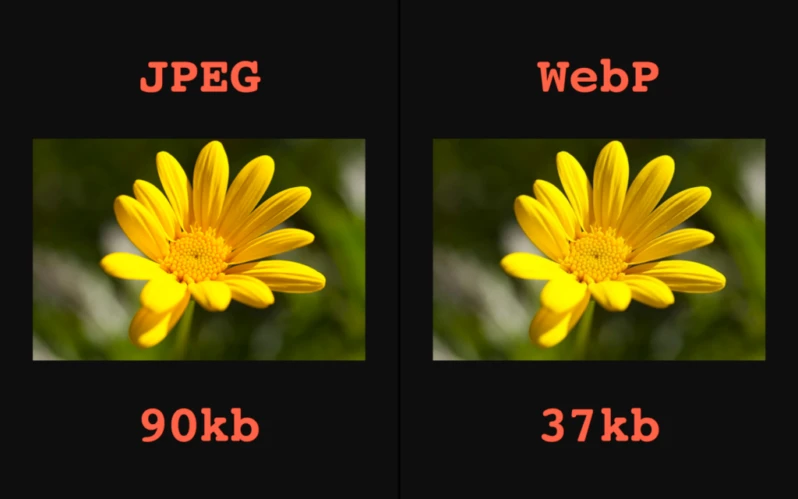
The image below shows a comparison between JPEG and WebP formats. The two images show almost no difference in detail, but the size of the WebP image is less than half of the JPEG image. As a result, most websites have started using WebP. This creates a problem: when we download images from webpages, we often get WebP format images, which are inconvenient to view and edit on computers or mobile phones. So what can we do about this?
Recommended websites to convert WebP online
Fortunately, such a need is not uncommon, and many websites have already launched online conversion services. Each service varies, so we have selected eight popular websites to compare based on three main criteria:
- Supports Links: If link support is available, users do not need to download the WebP image locally and re-upload it for conversion. Skipping this step can bring great convenience.
- Supports Cloud Storage: We often use cloud storage services like Dropbox and Google Drive to store images, so this criterion is very popular.
- Supports Batch Conversion: If there are multiple images to convert, converting and downloading one by one can be time-consuming and laborious. Some websites support uploading multiple images simultaneously, but none support submitting links in batches.
Below is the comparison table:
| Website | Supports Links | Supports Cloud Storage | Batch Conversion |
|---|---|---|---|
| iloveimg | N | Y | Y |
| AConvert | Y | N | N |
| Convertio | N | Y | Y |
| webptojpg | Y | Y | N |
| ASPOSE | Y | N | Y |
| photoretrica | Y | Y | Y |
| anyconv | N | N | Y |
| cdkm | Y | N | Y |
You might want to click the links in the table above to test if the websites are accessible, and if they can convert WebP to JPG, PNG or other formats successfully, then bookmark the ones that suit your needs for future use.
If you know of better websites or have other tools to recommend, feel free to share them in the comments section.
